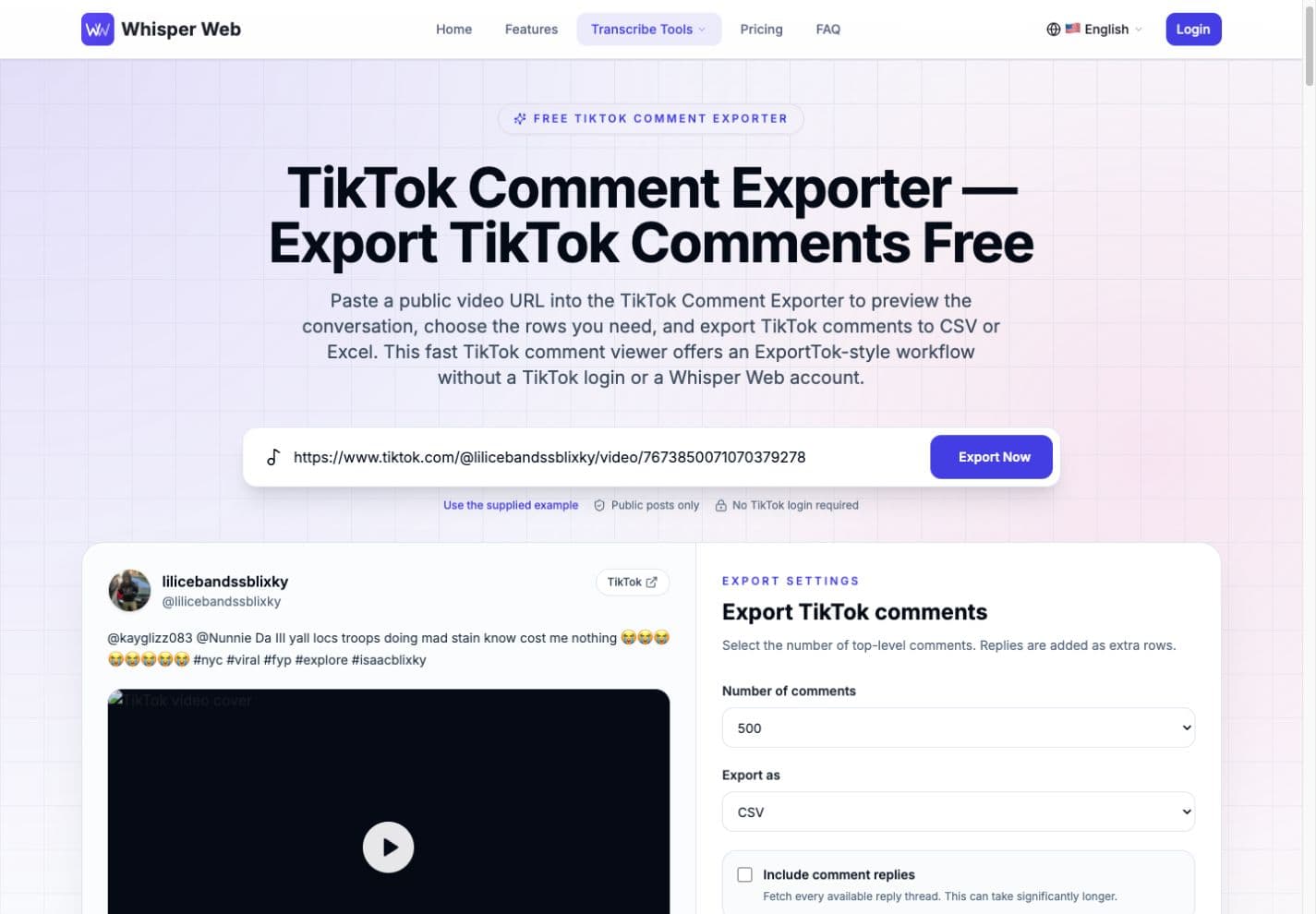
Paste a public video URL into the TikTok Comment Exporter to preview the conversation, choose the rows you need, and export TikTok comments to CSV or Excel. This fast TikTok comment viewer offers an ExportTok-style workflow with a free Whisper Web account and no TikTok login.
No TikTok login required
Free Whisper Web account required
Public videos and photo posts
TikTok Comment Exporter CSV and Excel formats
How it works
How the TikTok Comment Exporter Works
The TikTok Comment Exporter turns a public post link into a structured dataset in three clear steps. If you have tried ExportTok or copied replies by hand, this workflow gives you a faster way to export TikTok comments while keeping the original post visible for context. Start with the free TikTok comment viewer, confirm that the correct video and comments have loaded, then select your export settings. This workflow keeps preview and download decisions separate, so you can inspect the data before creating a file.
Public TikTok link
tiktok.com/@creator/video/...
Link copied
1. Copy the TikTok link
Open a public TikTok video or photo post in your browser or mobile app and copy its full URL. The TikTok Comment Exporter accepts standard share links and normal tracking parameters, so you do not need to clean the address before you export TikTok comments.
Paste TikTok URL…Export Now
PreviewChooseExport
2. Paste the URL and preview
Paste the link into the search box and select Export Now. Sign in or create a free Whisper Web account when prompted, then you will see the creator, post description, engagement totals, media preview, and an initial set of comments before choosing how much data to collect.
Export settings
500 comments · CSV
Download comments
3. Choose settings and download
Choose up to 20,000 top-level comments, select CSV or Excel, and decide whether to include available replies. After you confirm the settings, the TikTok Comment Exporter retrieves the requested pages and assembles the spreadsheet locally in your browser.
Fast, clear, flexible
Quick TikTok Export, Without the Busywork
Why it feels faster · 01
The TikTok Comment Exporter is designed for the moment when you need useful comment data, not another complicated dashboard. Paste one link, verify the post, and export TikTok comments in a format ready for filtering, review, or reporting. People looking for ExportTok can use the same familiar link-first approach inside Whisper Web.
Why it feels faster · 02
The built-in TikTok comment viewer shows real public context before you download. That makes the TikTok Comment Exporter easier to trust than a blind file generator: you can verify the creator, caption, engagement totals, and sample comments first.
One-link workflow
The TikTok Comment Exporter starts from the URL you already have. There is no code, browser extension, cookie export, or manual request setup between the post and the preview.
Preview before export
Use the TikTok comment viewer to confirm the source, scan sample responses, and check the visible comment total before you export TikTok comments for deeper analysis.
Flexible output controls
Choose CSV or XLSX, set the top-level limit, and add reply threads when the conversation needs more depth. This ExportTok-style flow stays simple while supporting larger research jobs.
A real Whisper Web preview shows how the TikTok Comment Exporter keeps the post, export controls, and public conversation together in one responsive workspace.
Practical use cases
What Is the TikTok Comment Exporter Used For?
The TikTok Comment Exporter helps creators, marketers, community teams, and researchers turn fast-moving public conversations into rows they can sort and review. Use the TikTok comment viewer for a quick check, or export TikTok comments when you need a reusable dataset. It is a practical ExportTok alternative for these common workflows.
Content strategy analysis
Use the TikTok Comment Exporter to group recurring questions, objections, jokes, and audience language. Teams can export TikTok comments, tag themes in a spreadsheet, and turn real responses into stronger hooks, follow-up videos, and editorial ideas.
Marketing campaign reports
The TikTok Comment Exporter gives campaign teams a stable file for post-launch review. Compare positive and negative reactions, record frequently mentioned products, and use the TikTok comment viewer to keep individual statements connected to the original public post.
Community management review
Use this export workflow to identify questions that deserve a response, comments with strong engagement, and threads that need closer moderation. ExportTok users will recognize the efficient path from public link to an offline community review queue.
Contest entry preparation
When a public promotion uses comments as entries, export TikTok comments to build a reviewable list before applying your published eligibility rules. The TikTok Comment Exporter preserves comment IDs and usernames so your selection process can be checked later.
Sentiment and language review
The TikTok Comment Exporter creates clean source material for manual coding or an approved analysis tool. A TikTok comment viewer helps you inspect nuance first, while the spreadsheet makes it easier to compare themes across hundreds of public responses.
Public research datasets
Researchers can use this export workflow to collect public text, timestamps, engagement counts, and reply relationships for permitted studies. Export TikTok comments only when your project has an appropriate legal, ethical, and platform-compliant basis for using the data.
Clean, normalized data
What Your TikTok Comment Export Includes
Export detail · 01
Every TikTok Comment Exporter download uses normalized columns, whether the provider returns mobile field names or a different shape. That consistency helps you export TikTok comments without rewriting a spreadsheet workflow whenever the provider changes. The TikTok comment viewer uses the same model as the final file, and the structure is familiar to ExportTok users.
Export detail · 02
The TikTok Comment Exporter keeps identity, conversation, engagement, and source-post details in separate, analysis-ready columns. Blank values remain blank instead of being guessed, and reply relationships stay explicit when the provider exposes them.
Export detail · 03
The TikTok Comment Exporter produces predictable headers for filters, pivot tables, qualitative coding, documented research, or imports into your approved analysis stack. Because the TikTok Comment Exporter separates parent IDs from comment IDs, reply rows remain useful after the file leaves the browser and enters a shared review process.
Comment ID
Reply-to ID
Comment text
Nickname
Username
User ID
Comment date
Like count
Reply count
Comment images
Author-liked status
Pinned status
User homepage
Video ID
Export formats
Choose CSV or Excel
The TikTok Comment Exporter supports two practical spreadsheet formats. Choose the smallest compatible file for your workflow, then export TikTok comments after checking the sample in the TikTok comment viewer. The format choice is available in the same place an ExportTok user would expect to find it.
CSV
The TikTok Comment Exporter creates UTF-8 CSV with an Excel-friendly byte order mark, correct quote and newline escaping, and protection against values being interpreted as spreadsheet formulas.
Excel (.xlsx)
The TikTok Comment Exporter builds a standards-based XLSX workbook with a frozen header row, filters, and readable column widths, making larger comment reviews easier to navigate.
Designed around real work
Built for Creators, Marketers, and Researchers
The TikTok Comment Exporter focuses on verifiable product capabilities instead of invented usage numbers. You can export TikTok comments in two formats, inspect public data in the TikTok comment viewer, and follow an ExportTok-style process without handing over TikTok credentials.
Top-level comment capacity
Up to 20,000
This export workflow can request up to 20,000 available top-level comments in one job, subject to provider and public-post availability.
Spreadsheet formats
CSV + Excel
The TikTok Comment Exporter lets you export TikTok comments as a lightweight CSV or a formatted XLSX workbook from the same settings panel.
TikTok credential requests
Zero
The TikTok Comment Exporter never asks for a TikTok password or cookies. Its TikTok comment viewer reads public post data through the server-side provider.
Workflow
Creator workflow
Turn repeated audience questions into ideas for follow-up clips. The TikTok Comment Exporter keeps the exact public wording available for responsible review.
Workflow
Social media workflow
Use the TikTok comment viewer to check tone, then group responses by campaign theme, product mention, or moderation priority in the exported sheet.
Workflow
Agency workflow
Build a transparent deliverable that clients can filter themselves. The ExportTok-style table is easier to verify than a slide containing only selected screenshots.
Workflow
Community workflow
Export public replies for an offline triage session, preserve the source URL, and return to TikTok before taking any action on individual comments.
Workflow
Research workflow
Use the TikTok Comment Exporter as a collection step, then document sampling limits, regional variation, deletions, and ethical handling in the research method.
Workflow
Operations workflow
Use the TikTok Comment Exporter to create a repeatable handoff for recurring reports. Teams can keep the source link, collection settings, review notes, and final spreadsheet together so every public-data check follows the same documented process.
TikTok export FAQ
TikTok Comment Exporter FAQ
These answers explain what the TikTok Comment Exporter can collect, how the TikTok comment viewer behaves, and where public-data limits still apply. They also cover the practical questions people ask when comparing Whisper Web with ExportTok.
Is the TikTok Comment Exporter free?
You can paste a public link, preview comments, and create a file without payment. Current export access is offered as part of Whisper Web, although provider costs, limits, or access terms may change as the service develops. If you are comparing ExportTok pricing, check the current on-page controls before starting a large job.
Do I need a Whisper Web account to use the TikTok Comment Exporter?
Yes. You can paste a link before signing in, but the TikTok Comment Exporter asks you to sign in or create a free Whisper Web account before it loads the post, previews sample comments, or lets you export TikTok comments. This account gate protects the shared provider connection, while the visible progress state shows when the exporter is collecting additional pages or building your file.
Does the TikTok comment viewer require a TikTok login?
No. The TikTok Comment Exporter works with public post information and never asks for your TikTok password, session cookie, or account authorization. Private, friends-only, deleted, age-restricted, or region-blocked posts may remain unavailable because the provider cannot access content that is not publicly returned.
Which TikTok links can I paste?
Paste a standard public TikTok video or photo-post URL, including links copied from the website or mobile sharing flow. The TikTok Comment Exporter normalizes ordinary tracking parameters before requesting data. Like ExportTok, it still depends on the public post and the upstream provider being available in the selected region.
How many comments can the TikTok Comment Exporter download?
Choose 500, 1,000, 2,000, 5,000, 10,000, 20,000, or all available up to the current 20,000 top-level cap. When you export TikTok comments, the actual result can be smaller if the post has fewer public rows or the provider reaches the end of its pagination.
Can I include replies in the export?
Yes. Enable Include comment replies before starting the file. The TikTok Comment Exporter then requests available reply pages for collected parent comments, subject to its reply safety cap. Replies require extra requests and take longer, while the initial preview keeps the page fast by showing a smaller top-level sample.
Can the TikTok Comment Exporter create CSV and Excel files?
Yes. Select CSV for a lightweight UTF-8 file that opens in most spreadsheet and analysis tools, or choose XLSX for filters, frozen headers, and set column widths. Both options export TikTok comments with the same normalized fields, so changing formats does not change the meaning of the collected rows.
What fields are included in each row?
The TikTok Comment Exporter can include comment and reply IDs, text, nickname, username, user ID, date, likes, reply count, comment images, author-liked and pinned status, user homepage, and video ID. A value stays empty when the provider does not return it; Whisper Web does not invent missing profile or engagement details.
How does the TikTok comment viewer handle privacy?
The preview and file use public post data returned through the Whisper Web server. The provider API key remains server-side, and the spreadsheet is assembled in your browser. As with ExportTok or any public-data tool, you are responsible for handling personal data lawfully, minimizing unnecessary collection, and respecting platform rules.
Why can exported totals differ from TikTok?
TikTok may remove, moderate, rank, hide, or region-filter comments, and displayed counters can lag behind available pages. The TikTok Comment Exporter stops when the provider reports no more public rows or pagination no longer advances. The TikTok comment viewer therefore reports what is currently retrievable, not a guaranteed historical archive.
Start with a public post
Export TikTok Comments From Your Next Public Video
Paste a link into the TikTok Comment Exporter, confirm the conversation in the TikTok comment viewer, and choose the rows you need. Whisper Web gives you an ExportTok-style path from public post to spreadsheet while keeping the provider key on the server and the final file in your browser.